


ダウンロード
最新バージョン : 2.1.0-RELESE
| 2.1.0-RELESE | ダウンロードページ |
OpenRTM@Github
OpenRTM-aist GitHubサイト
ROS
Robot Operating System
Choreonoid
モーションエディタ/シミュレータ
DAQ-Middleware
ネットワーク分散環境でデータ収集用ソフトウェアを容易に構築するためのソフトウェア・フレームワーク
産総研が提供するRTC集
東京オープンソースロボティクス協会
| 2.1.0-RELESE | ダウンロードページ |
OpenRTM-aist GitHubサイト
Robot Operating System
モーションエディタ/シミュレータ
ネットワーク分散環境でデータ収集用ソフトウェアを容易に構築するためのソフトウェア・フレームワーク
産総研が提供するRTC集
東京オープンソースロボティクス協会
RTC Builder
Open RTC Builder.
You can find your "MyFirstRTC" project in your workspace.
Open RTC.xml
Your input options are saved in RTC.xml.
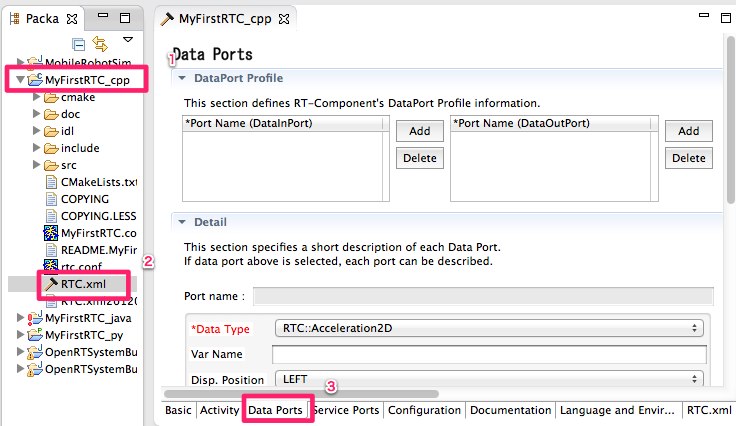
Double click and open "RTC Builder view", and Select "Data Port" tab.
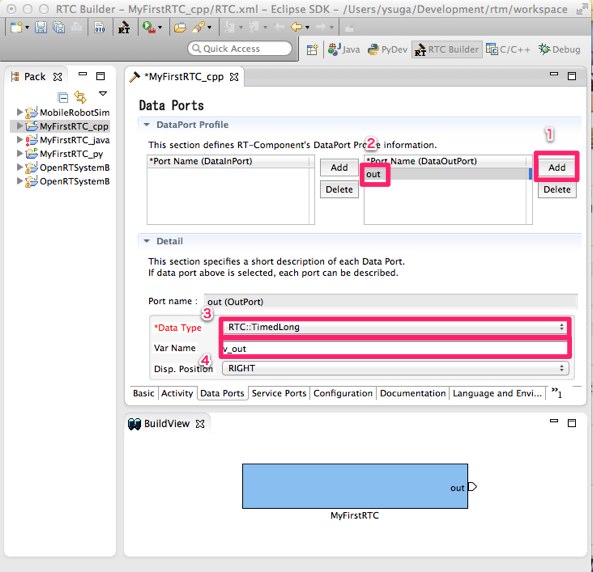
Add DataOutPort
Add DataOutPort and change "Port Name". Port name is not a variable's name. It's used as an interfaces name usually displayed in RT System Editor.
You can select "Data Type" of your DataOutPort by selecting the drop-down list.
* If you had no selection items in the Data Type list, your environmental variable RTM_ROOT Is not set. Please check here.
Please edit "Var name" of your DataOutPort. This name is used as a variable name in your cpp code.
Generate Code
Generate Code in Basic tab.
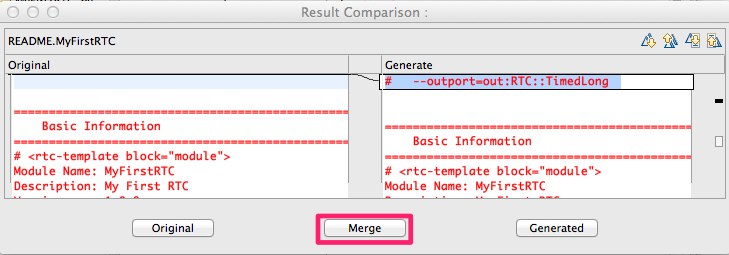
RTC Builder supports incremental development.
Your code and generated code in your project can be merged with the following dialog.
Select merge button.
Edit code
Your project may not need to use cmake. Open your cpp code and edit "onExecute" code.
RTC::ReturnCode_t MyFirstRTC::onExecute(RTC::UniqueId ec_id) { std::cout
Prev Up >> Next
m_v_out is a data buffer for the data port "out". The "v_out" is defined in RTC builder as "Var Name".
And you can see "m_v_outOut" that is the Variable name of DataOutPort. The "write" member function means "Output data from data buffer."
Documentation: