Install OpenRTM-aist 2.1

Installing to Windows
Install

Installation of software required for development
RTC development requires installation of Python, CMake, Doxygen, and Visual Studio.
Visual Studio
It is necessary not only for developing the C ++ version, but also for building the installer when creating the Python version and Java version of the RTC. Install it by downloading from the link, or obtain and install Visual Studio 2019/2022/2026 separately.
The latest version of Visual Studio that has been confirmed to work is 2026.I often forget to include the C ++ development environment. We recommend that you read the following instructions.
Python
Python is used not only for developing the Python language version of RTC, but also for various tools of OpenRTM-aist, so it must be installed. Python supported by OpenRTM-aist is 3.10, 3.11, 3.12, 3.13, 3.14. We recommend that you install the latest version.
Please note the following points when installing.- The Python installation destination corresponds to the selection [Customize installation] at the time of installation.
- For the procedure to specify the installation destination in [Customize installation], see the explanation on the following page.
CMake
CMake is required to automatically generate the files required for build (Visual Studio project file, Makefile on Linux, etc.) in various environments such as Windows and Linux.
Please install the latest version as much as possible.
- CMake(3.11以上推奨)
- cmake-4.3.3-windows-x86_64.msi (64bit)
- During the installation, you will be asked what to do with system PATH as [Install Options], it is recommended that you select Add CMake to the system PATH for all users.
Doxygen & Graphviz
Doxygen is a tool that automatically generates documents from comments such as source code.
Graphviz is a tool required to generate diagrams such as class diagrams when generating documents with Doxygen.
In OpenRTM-aist, various design information can be entered in RTCBuilder when designing RTC, and they are output as comments in the source code. By processing this with Doxygen, you can generate a beautiful RTC document.
Please install the latest version as much as possible.
- Doxygen
- doxygen-1.17.0-setup.exe
- If you are using Microsoft Edge and cannot download, please see the explanation for OpenRTM-aist.
During the installation, you will be asked what to do with the system PATH as the Install Options, but we recommend that you select Add Graphviz to the system PATH for all users. Download and execute the Windows version binary executable file from the web page.
After installation, run dot -v at the command prompt and check that the plugin information is displayed.
>dot -v
JDK8
Required when developing in Java versions of OpenRTM. Please see the explanation on the following page.Install OpenRTM-aist
After installing the above software, install OpenRTM-aist.
Download installer
Download and execute "msi" file.
| OpenRTM-aist-2.1.0-RELEASE_x86_64.msi | MD5:e1804a5aaa4fab85a5cdc777bd9c48c1 | 719MB |
This installer contains the following.
- Development environment for C ++
- OpenCV 4.13.0
- Past versions of DLLs for C ++ (Required when running the old RTC)
- Development environment for Python
- Development environment for Java
- omniORB 4.3.4
- OpenRTP (GUI tool, RTCBuilder,RTSystemEditor)
- JRE8 environment (Required for OpenRTP)
- VCVerChanger (GUI tool)
- rtshell (CUI tool)
Install
Please see the following page for details on the installation process. Try running the sample components to see if they are installed correctly. For details on system environment variables set by the installer, files to be installed, etc., see the following page.Checking system environment variables
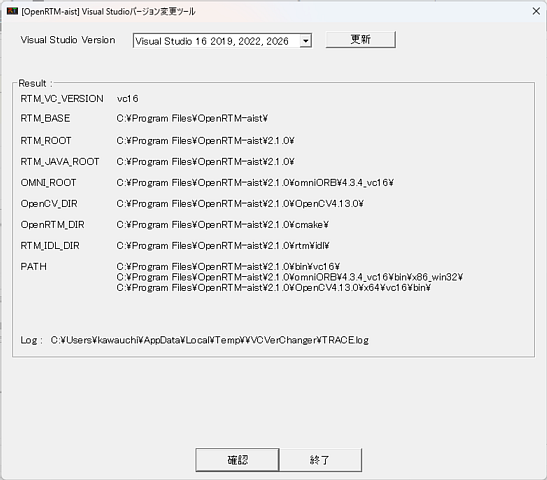
The system environment variable RTM_VC_VERSION is set to match the installed Visual Studio version. After installation, this environment variable expands to the value vc16, but we have confirmed that in some cases it may not expand due to Windows behavior. Therefore, we recommend checking the system environment variable with VCVerChanger.
Enter VCVerChanger in the search bar and launch it. Once launched, press the "確認" button, check the displayed path, and then press "終了".
Install Visual Studio Community
Install Visual Studio Community 2026
Obtaining the Installer
Please download the Visual Studio Community 2026 installer from the following page.
Click the [Free download] button under the edition labeled [Community] to start downloading the installer.
The installation procedure will be explained using version 2022 as an example.

Running the Installer
After the download is complete, open and run the downloaded file.
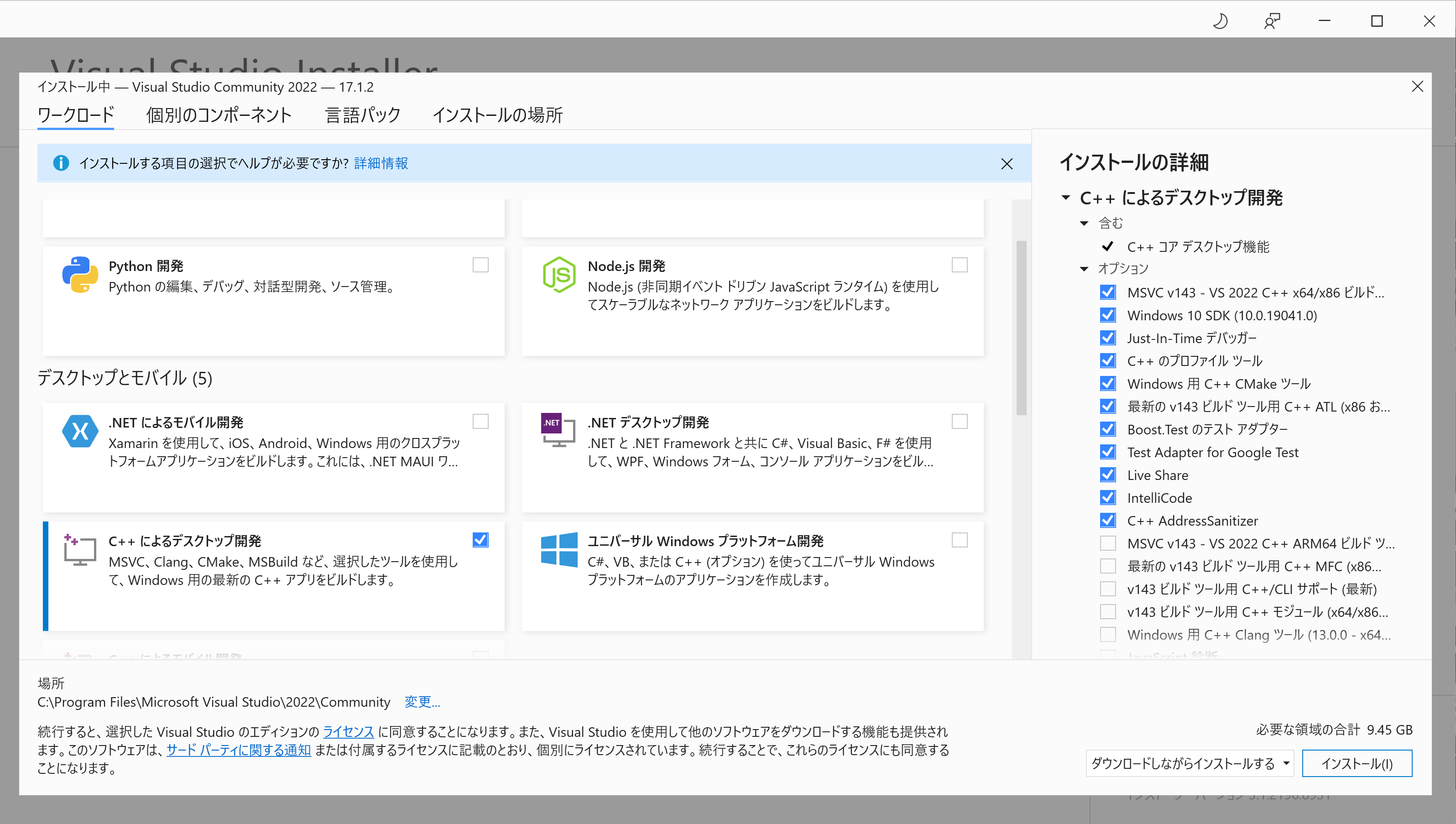
Follow the instructions, and when the screen shown below appears, check [Desktop development with C++] and click the [Install] button.
Verifying the Installation
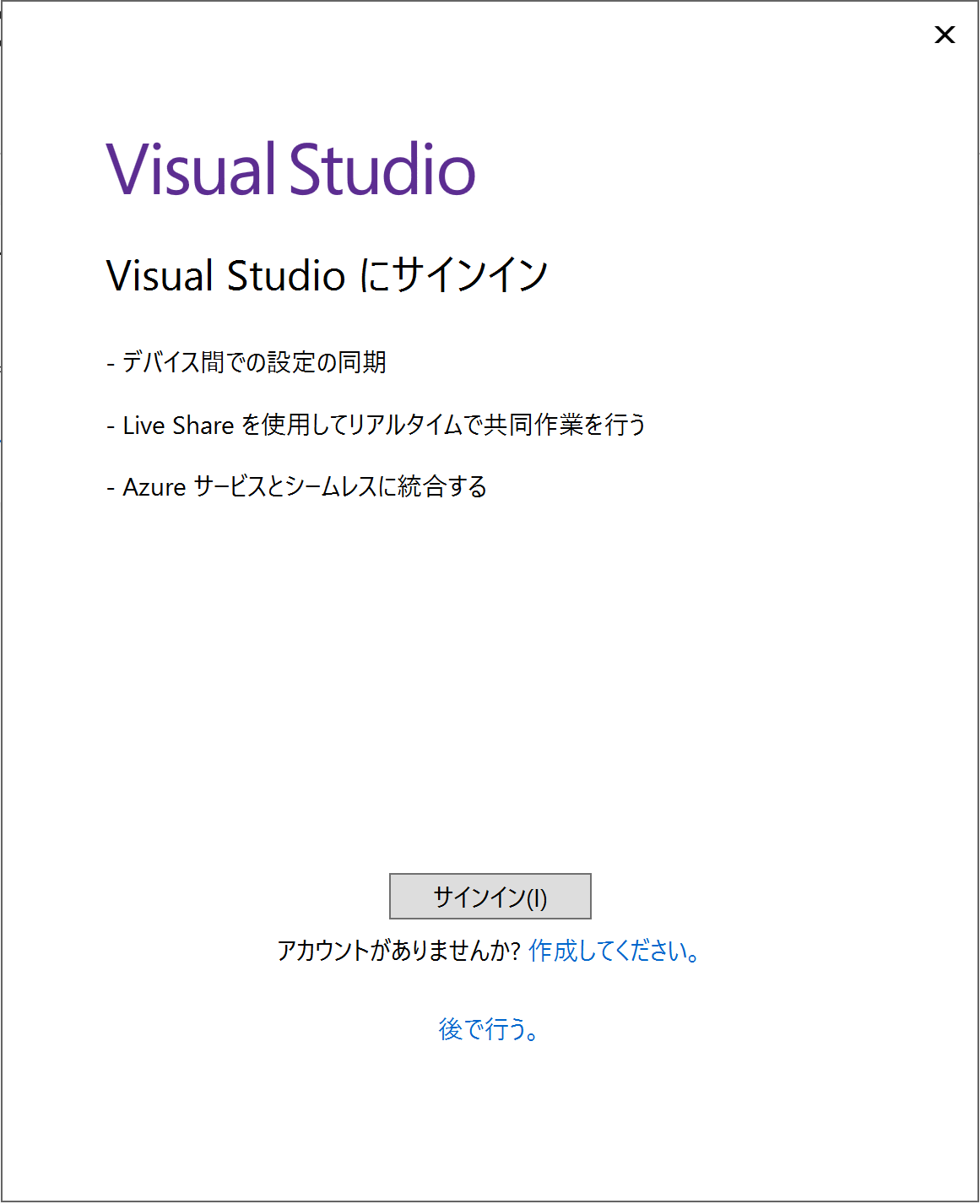
After the installation is complete, a sign-in screen will appear. Sign in with your Microsoft account.
You can use Visual Studio for 30 days without signing in.
For information about creating a Microsoft account, please refer to the following page.
How to create a new Microsoft account
Verifying That the C++ Compiler Is Installed
Be sure to verify that the **Desktop development with C++** workload has been installed.
If you can create a Visual C++ project, the installation is successful.
First, click [Create a new project].
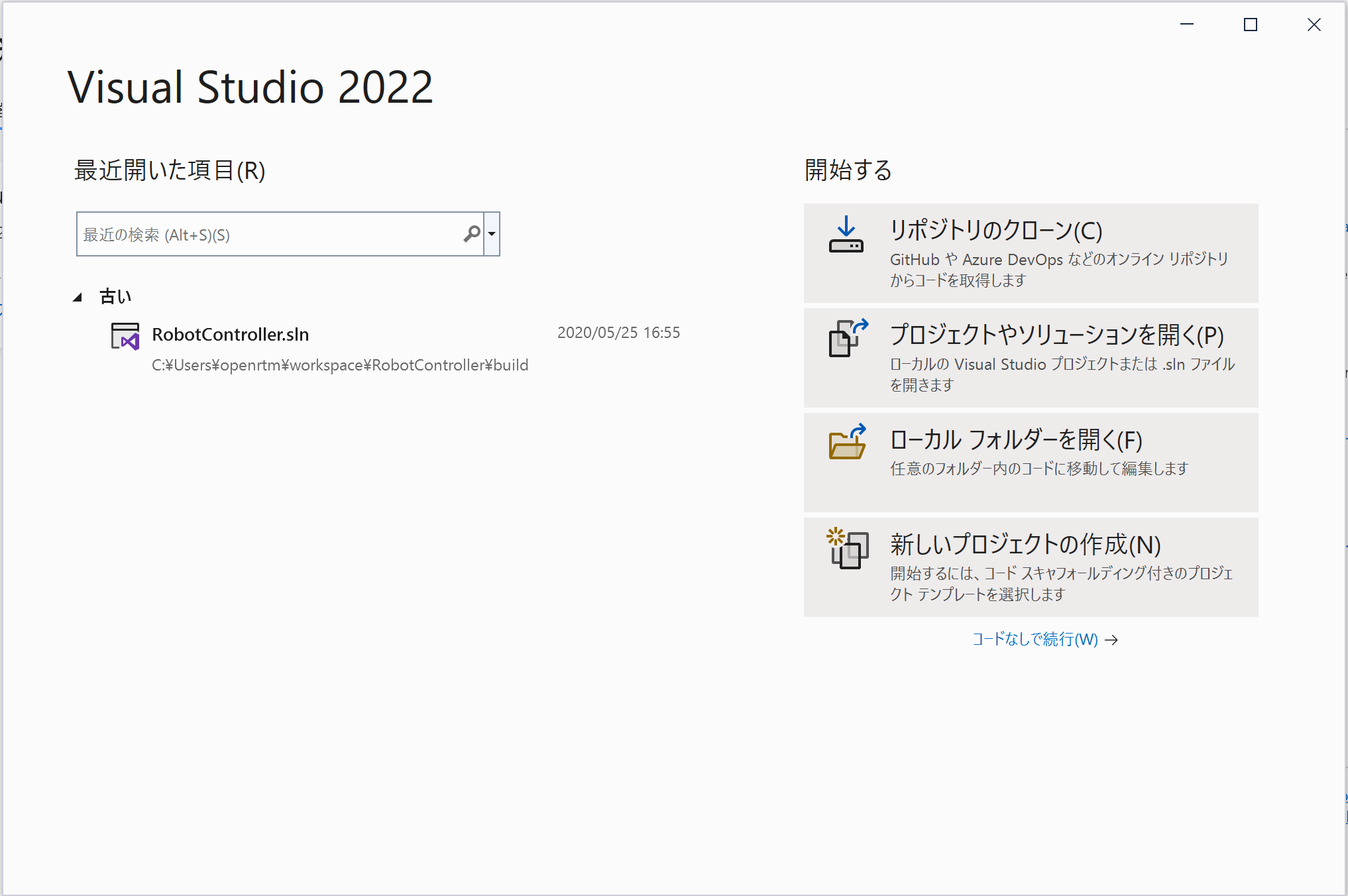
At this point, if options such as the following are available:
[Empty Project
Start from scratch with C++ for Windows. No starter files are provided.]
then the installation has been completed successfully.
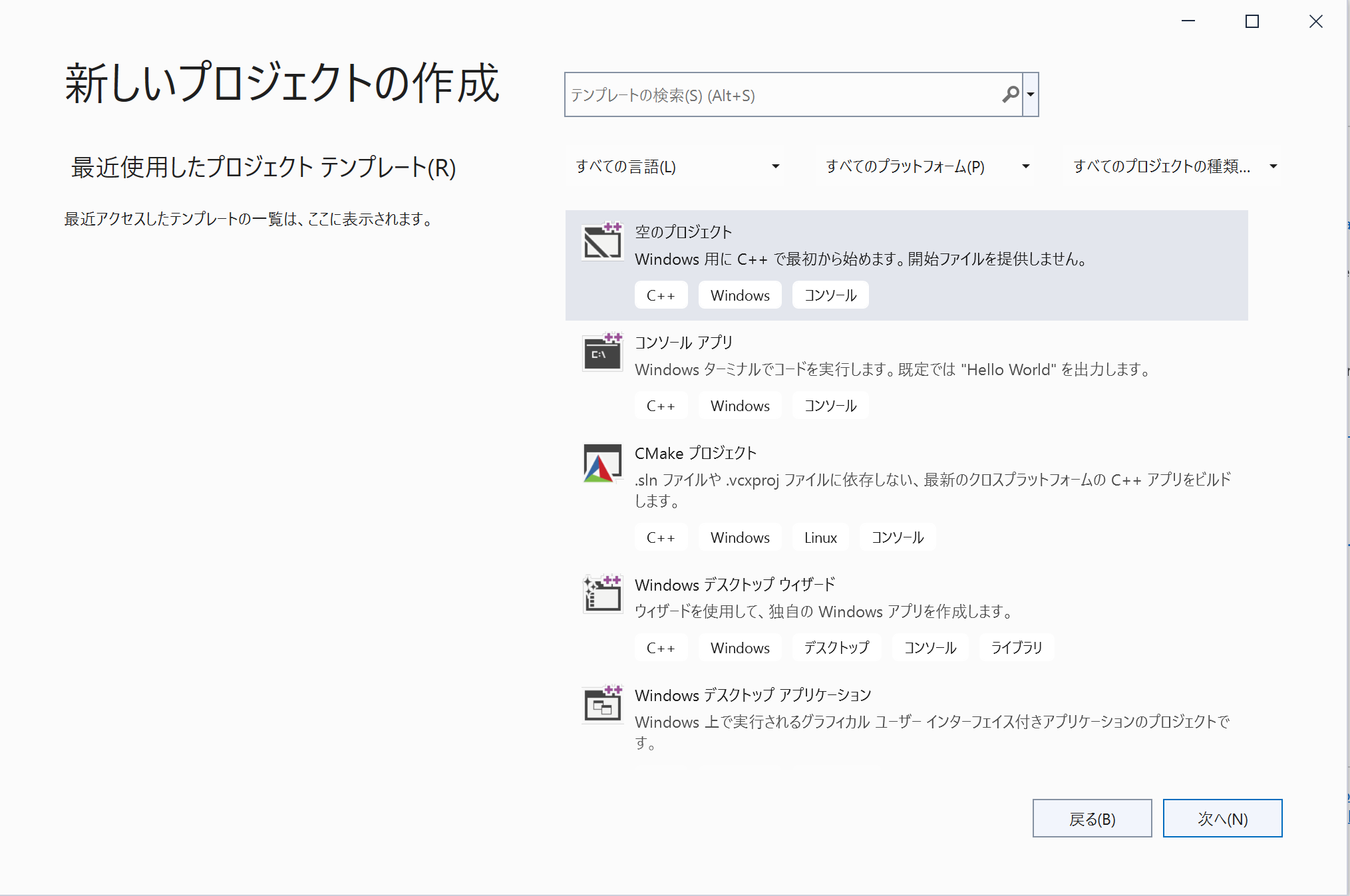
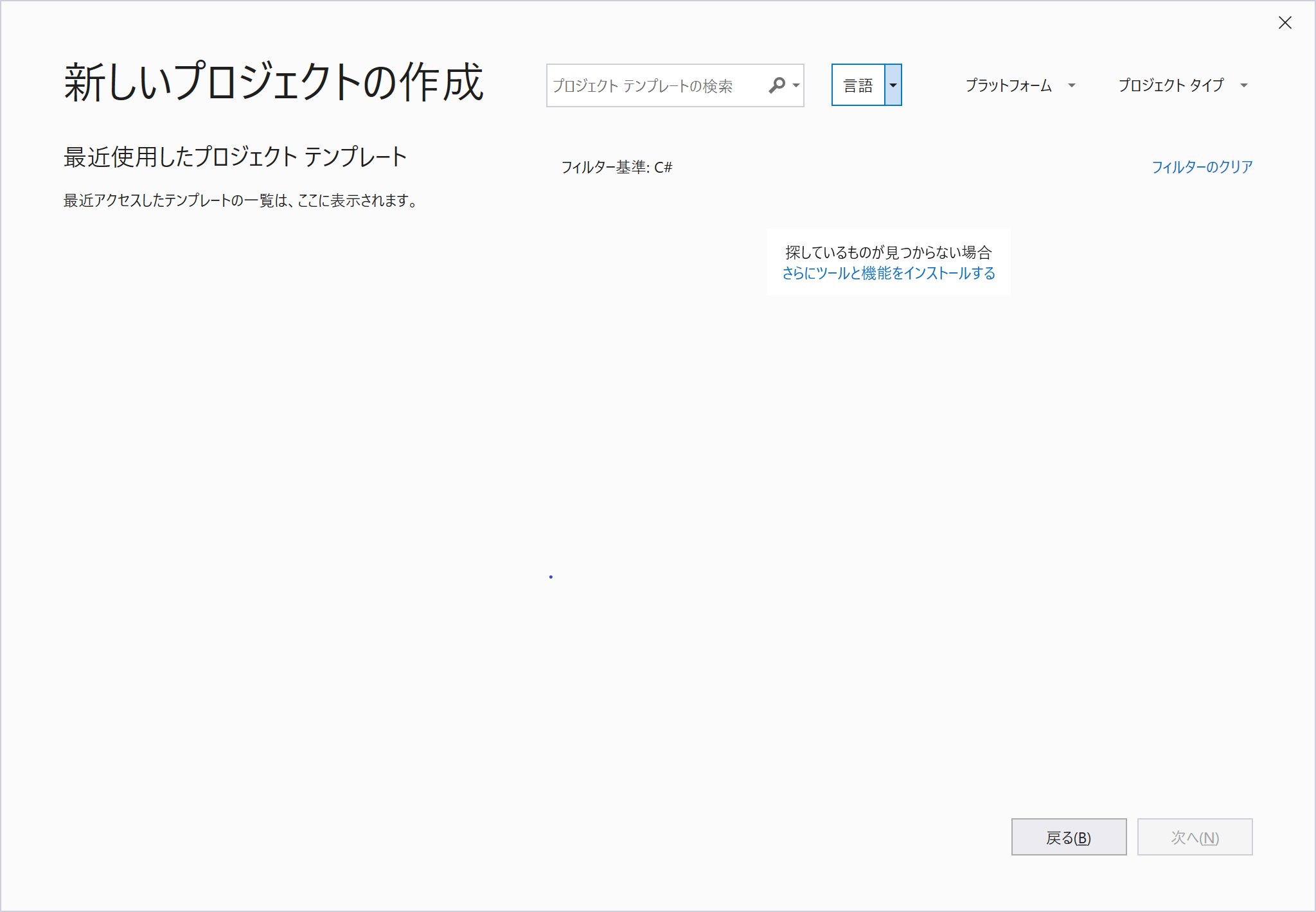
If it has not been installed, click:
[Can't find what you're looking for?
Install more tools and features]
This will launch the installer. Install the [Desktop development with C++ ] workload.
Operation Check
Run the sample component
After successful installation, you can check the operation with the attached sample component. We have prepared a bat file, so you can start it by double-clicking it.
The bat file is easily accessible by opening the start menu folder from [OpenRTM-aist 2.1.* x86_64] in the start menu.There is a bat file under each folder of "C ++_Examples" "C ++_OpenCV-Examples" "Python_Examples" "Java_Examples". For more information, see Let's start OpenRTM-aist in 10 minutes!.
- Let's start OpenRTM-aist in 10 minutes!・Run the sample component
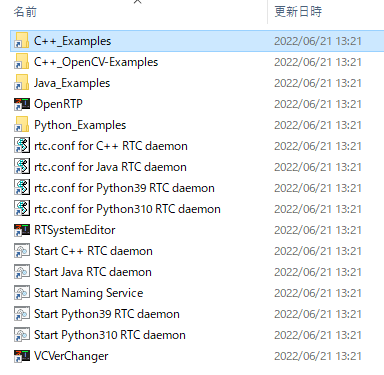
Start menu folder
The installation destination of the sample component is as follows.
 C:\Program Files\OpenRTM-aist\2.1.x\Components\C++\Examples
 C:\Program Files\OpenRTM-aist\2.1.x\Components\Python
 C:\Program Files\OpenRTM-aist\2.1.x\Components\Java
 C:\Program Files\OpenRTM-aist\2.1.x\Components\C++\OpenCV
List of sample components
Below is a brief description of the included sample components and a link to a page that explains how to use them.
Included with C ++, Python, and Java
| bat file name | brief description of the sample component | Explanation page |
| ConsoleIn.bat ConsoleOut.bat |
ConsoleIn.bat : Start ConsoleIn component that outputs the number entered from the console from OutPort. ConsoleOut.bat :Start ConsoleOut component that displays the number entered in the InPort on the console. |
SimpleIO |
| SeqIn.bat SeqOut.bat |
SeqIn.bat : Start SeqIn component that outputs random numbers (Short, Long, Float, Double and their sequence types). SeqOut.bat : Start SeqOut component that displays the numbers (Short, Long, Float, Double and their sequence types) that will be input to the InPort. |
SeqIO |
| MyServiceProvider.bat MyServiceConsumer.bat |
MyServiceProvider.bat : Start MyServiceProvider component that provides a service of type MyService. MyServiceConsumer.bat : Start MyServiceConsumer component that provides the MyService type service.。 |
SimpleService |
| ConfigSample.bat | Start ConfigSample component, which is an example of using the Configuration function. This is a sample to understand the behavior of Configuration by changing Configuration from RtcLink. | ConfigSample |
| Composite.bat | Start composite component creation sample PeriodicECSharedComponent component. It combines three sub-components, Sensor, Controller, and Motor. It is a good idea to connect to a component such as ConsoleIn and use it. | Composite |
Included with Python
| bat file name | brief description of the sample component | Explanation page |
| TkJoystickComp.bat | Sample GUI component using Tcl/Tk. Simple joystick component. | TkJoyStick |
| TkMobileRobotSimulator.bat | A simple simulator for mobile robots. The speed of the robot is received by InPort, and the position after movement is output from OutPort. | TkMobileRobotSimulator |
| TkMotorComp.bat | Sample GUI component using Tcl/Tk. GUI displays how the InPort rotates at the speed of the value received. | TkMotorComp |
| SliderComp.bat | Sample GUI component using Tcl/Tk. Output the value specified by Slider from OutPort. | SliderComp |
| TkMotorPosComp.bat | Sample GUI component using Tcl/Tk. GUI displays how the value received by InPort moves as the angle of rotation. | TkMotorPosComp |
| TkLRFViewer.bat | Sample GUI component using Tcl/Tk. Display the data output from the laser range sensor, etc. | tkLRFViewer |
| AutoControl.bat | Output speed with a component for mobile robots. The data of the positioning sensor is received by InPort, the speed of the robot is calculated, and it is output from OutPort. | Autocontrol |
Included with Python, and Java
| bat file name | brief description of the sample component | Explanation page |
| ExtConsoleIn.bat ExtConsoleOut.bat ExtConnector.bat |
ExtConsoleIn.bat : Console controlled by an external trigger Starts a component that outputs the input numerical value from Outport. ExtConsoleOut.bat : Starts a component that outputs the numerical value input to the Inport controlled by an external trigger to the console. ExtConnector.bat : Launches a program that sends external triggers to ExtTrigger / ConsoleInComp.class or .py and ExtTrigger / ConsoleOutComp.class or .py. |
ExtTrigger |
Included with Java
| bat file name | brief description of the sample component | Explanation page |
| GUIIn.bat | Launch a GUI sample that outputs the slider position from Outport. You can also connect to ConsoleOutComp.class. | GUIIn |
OpenCV C ++ version
| bat file name | brief description of the sample component | Explanation page |
| Affine.bat | Affine transforms the input image. | |
| BackgroundSubtractionSimple.bat | Outputs the change from the image when the key was input in the input image. | |
| Binarization.bat | Converts an input image to a binary black and white image. | |
| CameraViewer.bat | The image received by ImPort is displayed on the screen. | CameraViewer |
| Chromakey.bat | Extracts an object by removing a specific color from the image. | Chromakey |
| DialationErosion.bat | Perform dialing / erosion processing | |
| Edge.bat | Outputs the first-order derivative image in the X direction, the first-order derivative image in the Y direction, and the Laplacian image (second-order derivative image) | |
| Findcontour.bat | Extract the outline and display the outline in the image. | |
| Flip | Invert the image. | Flip usage example |
| Histgram.bat | Displays changes in histogram while changing brightness / contrast of black and white image | |
| Hough.bat | Line extraction by Hough transform | |
| ImageCalibration.bat | Calibrate the camera. | Automatically start from TkCalibGUI |
| ImageSubtraction.bat | Background image is extracted from the input image, the foreground image part is output as a mask image and the background image is output. | ImageSubtraction |
| ObjectTracking.bat | Tracks an object selected on the screen and show the position by a red oval. | ObjectTracking |
| OpenCVCamera.bat | Output the captured image of the USB camera from OutPort. | OpenCVCamera |
| Perspective.bat | Perspective conversion of image (Convert as viewed from below. | |
| RockPaperScissors.bat | Judgment of Goocho kipper in image. | |
| Rotate.bat | Rotates and scales images | |
| Scale.bat | Processes images for scaling | |
| Sepia.bat | Separates images | |
| SubtractCaptureImage.bat | Updates the background in real-time using the dynamic background subtraction method. | SubtractCaptureImage |
| Template.bat | Template matching | |
| TkCalibGUI.bat | GUI for ImageCalibration component that performs camera calibration. | TkCalibGUI |
| Translate.bat | Performs two-dimensional translation of images |
Build from the source code (C++)
If you want to modify OpenRTM-aist itself and use it on Windows, you can get the source code of OpenRTM-aist and build it. Since CMake is supported from 2.0 series, the procedure is different from 1.2 series.
Required software and libraries
Following software is required. For details, see Installation of OpenRTM-aist 2.1 series on Windows
- Visual Studio
- Python
- CMake
- Doxygen & Graphviz(If you also want to do a document build.)
- omniORB 4.3.4
The pre-built binary package provided by openrtm.org is available under the name omniORB-4.3.4-x64-vc16-pyXX.zip at the link below. Please replace it with the version of python to install XX, download the appropriate one, and extract it to a suitable location (C:\workspace\omniORB in the explanation below).
For more information on building with other libraries, see RT System Development (Advanced)・Build process of OpenRTM-aist(C++) by using CMake
Command procedure at build/installation
Get the source code. Check out the master branch for the latest OpenRTM-aist 2.1 source, and v2.1.0 for the 2.1.0 release source.
 git clone https://github.com/OpenRTM/OpenRTM-aist
 cd OpenRTM-aist
 git checkout -b v210-src refs/tags/v2.1.0
- -DORB_ROOT : Downloaded and unzipped omniORB path
- -G :Visual Studio version("Visual Studio 18 2026" "Visual Studio 17 2022" "Visual Studio 16 2019" etc.)
- -DCMAKE_INSTALL_PREFIX : Installation path from source
 mkdir build
 cd build
 cmake -DORB_ROOT=C:/workspace/4.2.5-x64-vc16-py314 -G "Visual Studio 18 2026" -DCMAKE_INSTALL_PREFIX=C:/workspace/openrtminstall ..
Then execute the following command. Finally, if you see the following, the build is successful.
 cmake --build . --verbose --config Release
 The build was successful.
     0 Warnings
     0 Error
If the build is successful, complete the installation with the following command:
cmake --build . --config Release --target install
Batch processing with script
I will introduce a script (OpenRTM-build-Windows.bat) that batch processes from download of omniORB to source build and installation. It is executed by placing it under the OpenRTM-aist directory that has been git cloned.
 cd OpenRTM-aist
 copy scripts\OpenRTM-build-Windows.bat .
 OpenRTM-build-Windows.bat > build.log
This OpenRTM-build-Windows.bat file is used during the build process for integrating it into the Windows Installer MSI. Please use only the necessary options when using CMake.
What the installer does
What the installer does
The installer copies the files and configures the system according to the following work contents. It is described below for reference when confirming that the installation and uninstallation are performed correctly.
- Copy various files under the installation directory (C:\Program Files)
- Create an OpenRTM-aist folder under the start menu and set various shortcuts.
- Environment variable settings (when OpenRTM-aist 2.1.0 version is installed with default settings)
 RTM_BASE=C:\Program Files\OpenRTM-aist\
 RTM_ROOT=C:\Program Files\OpenRTM-aist\2.1.0\
 RTM_VC_VERSION=vc16
 RTM_JAVA_ROOT=C:\Program Files\OpenRTM-aist\2.1.0\
 RTM_IDL_DIR=C:\Program Files\OpenRTM-aist\2.1.0\rtm\idl\
 OMNI_ROOT=C:\Program Files\OpenRTM-aist\2.1.0\omniORB\4.3.4_vc16\
 OpenCV_DIR=C:\Program Files\OpenRTM-aist\2.1.0\OpenCV4.13.0\
 OpenRTM_DIR=C:\Program Files\OpenRTM-aist\2.1.0\cmake\
- Additional settings to PATH (when OpenRTM-aist 2.1.0 version is installed with default settings)
 C:\Program Files\OpenRTM-aist\2.1.0\bin\vc16\
 C:\Program Files\OpenRTM-aist\2.1.0\omniORB\4.3.4_vc16\bin\x86_win32\
 C:\Program Files\OpenRTM-aist\2.1.0\OpenCV4.13.0\x64\vc16\bin\
Files to be installed
The files are installed with the following structure.
 <install_dir>
   + OpenRTM-aist
      + 1.x.x  : Older version runtime
      + 2.0.x  : Older version runtime
      + 2.1.x
         + bin: dll、lib Various commands
         + cmake: OpenRTMConfig.cmake
         + coil: coil header files
         + Components
            + C++
               + Examples: C++ sample component
               + OpenCV: OpenCV C ++ sample component
            + Java: Java sample component
            + Python: Python sample component
         + ext: Extension module file
         + hrtm: HRTM Wrapper Library
         + jar: jar files
         + jre: AdoptOpenJDK JRE
         + omniORB 4.3.4
         + OpenCV 4.13.0
         + rtm: OpenRTM-aist header files
            + idl: OpenRTM-aistIDL files
         + util
            + OpenRTP: RTCBuilder and RTSystemEditor tools
            + RTSystemEditor:
            + VCVerChanger: Tool to specify the version of Visual Studio you are using
Installing to Linux
Install

OpenRTM-aist is provided with a deb package that can be used on Ubuntu and Debian GNU Linux.
2.1 is currently compatible with Ubuntu 22.04, 24.04 (amd64, arm64 respectively). Please note that the supported version and support for Ubuntu/Debian GNU Linux are subject to change without notice.
Changes in 2.1 series
SSM communication function can now be installed. Since the SSM library is statically linked, you do not need to install SSM separately. The following will be installed from the openrtm2-ssm-tp deb package.
 usr/
 ├── bin
 │   ├── killssm
 │   ├── lsssm
 │   ├── psssm
 │   ├── ssm-advance-player
 │   ├── ssm-coordinator
 │   ├── ssm-date
 │   ├── ssm-graph
 │   ├── ssm-logger
 │   ├── ssm-monitor
 │   ├── ssm-player
 │   ├── ssm-proxy
 │   ├── ssm-transporter
 │   └── topssm
 ├── etc
 │   └── transport
 │       └── rtc.ssm.conf
 └── share
     └── openrtm-2.1
         └── transport
             └── SSMTransport.so
This feature will not be installed if you run the "Batch Installation Script" described in the next section without any options.
You can install it by specifying the option "-l c++ --ssm". You can check this with --help.
Bulk installation script
To install 2.1 series, paste the following into the shell prompt and execute it. C ++ version, Python version, Java version, OpenRTP (amd64 only), rtshell, JDK8 will be installed. Scripts are not saved locally.
※By executing the script, even if multiple versions of Java are installed, it is switched to using Java8.
$ bash <(curl -s https://raw.githubusercontent.com/OpenRTM/OpenRTM-aist/master/scripts/openrtm2_install_ubuntu.sh)
This will install the following packages:
 $ dpkg -l | grep openrt
 ii  openrtm2:arm64                         2.1.0-0                                  arm64        OpenRTM-aist, RT-Middleware distributed by AIST
 ii  openrtm2-dev:arm64                     2.1.0-0                                  arm64        OpenRTM-aist headers for development
 ii  openrtm2-doc                           2.1.0-0                                  all          Documentation for openrtm2
 ii  openrtm2-example:arm64                 2.1.0-0                                  arm64        OpenRTM-aist examples
 ii  openrtm2-idl:arm64                     2.1.0-0                                  arm64        OpenRTM-aist idls for development
 ii  openrtm2-java:arm64                    2.1.0-0                                  arm64        OpenRTM-aist, RT-Middleware distributed by AIST
 ii  openrtm2-java-example:arm64            2.1.0-0                                  arm64        OpenRTM-aist-Java examples
 ii  openrtm2-naming:arm64                  2.1.0-0                                  arm64        OpenRTM-aist name server launcher
 ii  openrtm2-python3                       2.1.0-0                                  arm64        OpenRTM-aist, RT-Middleware distributed by AIST
 ii  openrtm2-python3-example               2.1.0-0                                  arm64        OpenRTM-aist-Python examples
Using the default pip version will cause rtshell installation to fail.
Follow the instructions in the yellow text displayed by the installation script and add the following to /etc/pip.conf (create a new file if it doesn't exist).
 $ vi /etc/pip.conf
 [global]
 break-system-packages = true
After configuring the settings above, you can install rtshell by running the installation script again.
 $ pip3 list | grep aist
 OpenRTM-aist-Python        2.1.0
 rtctree-aist                       4.2.5
 rtshell-aist                       4.2.10
 rtsprofile-aist                    4.1.6
By specifying the option, it is possible to install the package according to the purpose. help can be found below.
$ bash <(curl -s https://raw.githubusercontent.com/OpenRTM/OpenRTM-aist/master/scripts/openrtm2_install_ubuntu.sh) --help
For details on the installed packages, see What the installer does
Installing packages for ROS
In 2.1 series, you can install the package for ROS communication function.
This section explains how to install packages in an environment where ROS2 is installed.
As mentioned in help, the ROS package installation options are supported below.
[-e ros2|all] [--ros2]
If you have already executed the installation script without any options and want to install additional packages for ROS and ROS2, you can use "-l c ++ --ros2l".
$ bash <(curl -s https://raw.githubusercontent.com/OpenRTM/OpenRTM-aist/master/scripts/openrtm2_install_ubuntu.sh) -l c++ --ros2
If you want to install all the packages for ROS and ROS2 from the beginning, you can do it with "-l all --ros2".
$ bash <(curl -s https://raw.githubusercontent.com/OpenRTM/OpenRTM-aist/master/scripts/openrtm2_install_ubuntu.sh) -l all --ros2
Check the installed packages.
 $ dpkg -l | grep openrt
 ii  openrtm2:amd64               2.1.0-0   amd64        OpenRTM-aist, RT-Middleware distributed by AIST
 ii  openrtm2-dev:amd64           2.1.0-0   amd64        OpenRTM-aist headers for development
 ii  openrtm2-doc                 2.1.0-0   all          Documentation for openrtm2
 ii  openrtm2-example:amd64       2.1.0-0   amd64        OpenRTM-aist examples
 ii  openrtm2-idl:amd64           2.1.0-0   amd64        OpenRTM-aist idls for development
 ii  openrtm2-java:amd64          2.1.0-0   amd64        OpenRTM-aist, RT-Middleware distributed by AIST
 ii  openrtm2-java-example:amd64  2.1.0-0   amd64        OpenRTM-aist-Java examples
 ii  openrtm2-naming:arm64        2.1.0-0   arm64        OpenRTM-aist name server launcher
 ii  openrtm2-python3             2.1.0-0   amd64        OpenRTM-aist, RT-Middleware distributed by AIST
 ii  openrtm2-python3-example     2.1.0-0   amd64        OpenRTM-aist-Python examples
 ii  openrtm2-ros2-tp:amd64       2.1.0-0   amd64        OpenRTM-aist extension ROS2 package
 ii  openrtp2:amd64               2.1.0-0   amd64        OpenRTP, Open RT Platform distributed by AIST
Operation Check
Run the sample component
After successful installation, you can check the operation with the attached sample component. The installation destination of the sample component is as follows.
 /usr/share/openrtm-2.1/components/c++/examples
 /usr/share/openrtm-2.1/components/python3/
 /usr/share/openrtm-2.1/components/java
Start OpenRTP, a tool for operating the RTC and building the RT system.
- OpenRTM-aist 2.x series is started by the openrtp2 command.
$ openrtp2
- Install OpenRTM-aist (C++ Version) 1.2・Operation Check (On Linux)
- Install OpenRTM-aist (Python Version) 1.2・Operation Check (On Linux))
- Install OpenRTM-aist (Java Version) 1.2・Operation Check (On Linux)
Installation of OpenCV sample components
OpenCV's C ++ sample components do not provide a deb package for installation. We provide a script to generate a deb package from the source, so please build and install it.
Installation example of OpenCV4.5.4
This is an example of building and installing the OpenCV main unit of version 4.5.4 and the extension module group (opencv_contrib) together.
- First, comment in the following deb-src line in /etc/apt/sources.list.
 $ sudo vi /etc/apt/sources.list
      :
 deb-src http://jp.archive.ubuntu.com/ubuntu/ *** universe
    or
deb-src http://us.archive.ubuntu.com/ubuntu/ *** universe- The installation of OpenCV is completed by executing the following command.
 sudo apt build-dep opencv
 wget https://github.com/opencv/opencv/archive/refs/tags/4.5.4.tar.gz -O opencv-4.5.4.tar.gz
 tar xvzf opencv-4.5.4.tar.gz
 wget https://github.com/opencv/opencv_contrib/archive/refs/tags/4.5.4.tar.gz -O opencv_contrib-4.5.4.tar.gz
 tar xvzf opencv_contrib-4.5.4.tar.gz
 cd opencv-4.5.4
 mkdir build
 cd build
 cmake -DOPENCV_EXTRA_MODULES_PATH=../../opencv_contrib-4.5.4/modules -DBUILD_opencv_java=OFF ..
 make -j$(nproc)
 sudo make install
 sudo ldconfig
OpenCV sample component build procedure
Get the source ImageProcessing, build it, and generate a deb package.
 git clone https://github.com/OpenRTM/ImageProcessing
 cd ImageProcessing/opencv
 mkdir build
 cd build
 cmake ..
 ./build_linux_package.sh
This will generate imageprocessing_2.x.x_amd64.deb and install it.
 sudo dpkg -i imageprocessing_2.x.x_amd64.deb
 ls /usr/share/openrtm-2.0/components/c++/opencv-rtcs/
 Affine                       CameraViewer     Edge         Histogram         ImageSubtraction  Perspective        Scale                 Template
 BackGroundSubtractionSimple  Chromakey        Findcontour  Hough             ObjectTracking    RockPaperScissors  Sepia                 Translate
 Binarization                 DilationErosion  Flip         ImageCalibration  OpenCVCamera      Rotate             SubtractCaptureImage  rtc.conf
An executable file (*** Comp) is installed under each sample directory, so please try it.
Build from the source code
If you want to change the source of OpenRTM-aist itself and use it, you can get the source code of OpenRTM-aist and build it.
Build with Docker
I will introduce the procedure to build in the environment where only the minimum library required for OpenRTM-aist source build is installed using Dockerfile.
I use the docker build command to generate a Docker image, but it is recommended because it can be built in a clean environment every time.
If you are using Docker for the first time, please install it as follows. If you have an Ubuntu desktop environment, the docker.io package is probably provided.
sudo apt install docker.io
Build C ++ source
The OpenRTM-aist 2.1 series source includes Dockerfile for Ubuntu22.04 and 24.04.
 OpenRTM-aist/scripts/ubuntu_2204/Dockerfile
 OpenRTM-aist/scripts/ubuntu_2404/Dockerfile
The build procedure is as follows. This is a build example for Ubuntu 24.04.
Here, the latest OpenRTM-aist source is obtained from GitHub, but you can do the same procedure for building the modified source.
 git clone https://github.com/OpenRTM/OpenRTM-aist
 sudo docker build -t test -f OpenRTM-aist/scripts/ubuntu_2404/Dockerfile .
If the build finishes without error, you can see that the Docker image named test specified by the -t option has been generated.
 sudo docker images
 REPOSITORY       TAG           IMAGE ID          CREATED           SIZE
 test             latest        0bc00f471b64      27 seconds ago    1.52GB
If you modify the source and repeat until the build passes, many images <none> will be generated. You can delete by specifying IMAGE ID with docker rmi, but if you want to delete all at once, it is convenient to execute the following command.
sudo docker rmi $(sudo docker images -f dangling=true -q)
About Docker image "openrtm/develop-rtm"
The first line of the Dockerfile used in the source build looks like this for Ubuntu 22.04 and 24.04 respectively, and uses the image with this name uploaded to the Docker hub.
 FROM openrtm/devel-rtm:ubuntu22.04
        or
FROM openrtm/devel-rtm:ubuntu24.04- For Ubuntu 22.04:humble
- For Ubuntu 24.04:jazzy
 OpenRTM-aist/scripts/ubuntu_2204/Dockerfile.devel-rtm
 OpenRTM-aist/scripts/ubuntu_2404/Dockerfile.devel-rtm
Script that batch processes up to deb package creation with Docker
The script introduced here is used when creating the deb package for the release of OpenRTM-aist.
If you want to modify and install the OpenRTM-aist source, you can easily try it with the deb package.
This script performs from source build to deb package generation with Docker, and performs the process of copying the deb package that is the deliverable from the Docker container to the host side at once.
The procedure for creating a deb package for Ubuntu 24.04 is as follows.
 git clone https://github.com/n-kawauchi/RTM-src-pkgs-docker-build
 cd RTM-src-pkgs-docker-build/ubuntu_2404/
 sh build-cxx.sh
 ls -l
 drwxr-xr-x  2 root    root    4096 Jun 30 15:53 cxx-deb-pkgs/
The deb package of the deliverable is output under cxx-deb-pkgs. Since the owner is root, it is easier to access if you change it to the execution user.
Since we are using a Docker image with ROS installed, a package for ROS2 (openrtm2-ros2 -tp) will also be generated. The SSM package (openrtm2-ssm-tp), which was added in version 2.1, will also be generated.
 ls cxx-deb-pkgs/
 openrtm2_2.1.0-0_amd64.buildinfo  openrtm2-dev_2.1.0-0_amd64.deb      openrtm2-naming_2.1.0-0_amd64.deb
 openrtm2_2.1.0-0_amd64.changes    openrtm2-doc_2.1.0-0_all.deb        openrtm2-ros2-tp_2.1.0-0_amd64.deb
 openrtm2_2.1.0-0_amd64.deb        openrtm2-example_2.1.0-0_amd64.deb  openrtm2-ssm-tp_2.1.0-0_amd64.deb
 openrtm2_2.1.0-0.dsc              openrtm2-idl_2.1.0-0_amd64.deb      openrtm2-ssm-tp-dbgsym_2.1.0-0_amd64.ddeb
(※)Running this script in an amd64 environment will generate a deb package for amd64, and running it in an aarch64 environment will generate a deb package for arm64.
If you want to modify and install the OpenRTM-aist source, comment out the following part of the build-cxx.sh script, place the OpenRTM-aist source in the same directory as build-cxx.sh, and execute it.
 #----- OpenRTM-aist
 echo "${password}" | sudo -S rm -rf ${TARGET}-*
 #rm -rf OpenRTM-aist    <-- Comment out
 #git clone https://github.com/OpenRTM/OpenRTM-aist    <-- Comment out
Build Python source
OpenRTM-aist-Python source does not include Dockerfile. The following Dockerfile is used when creating the deb package for the release of OpenRTM-aist-Python.As with C ++ source build, I will introduce a script that performs from source build to deb package generation with Docker, and the process of copying the deb package that is the deliverable from the Docker container to the host side at once.
The procedure for creating a deb package for Ubuntu 24.04 is as follows.
 git clone https://github.com/n-kawauchi/RTM-src-pkgs-docker-build
 cd RTM-src-pkgs-docker-build/ubuntu_2404/
 sh build-python.sh
The deb package of the deliverable is output under python-deb-pkgs.
 ls python-deb-pkgs/
 openrtm2-python3_2.1.0-0_amd64.changes  openrtm2-python3_2.1.0-0.dsc
 openrtm2-python3_2.1.0-0_amd64.deb      openrtm2-python3-example_2.1.0-0_amd64.deb
If you want to modify and install the OpenRTM-aist-Python source, comment out the following part of the build-python.sh script. Place the OpenRTM-aist-Python source in the same directory as build-python.sh and Dockerfile-python-deb and execute it.
 #----- OpenRTM-aist-Python
 echo "${password}" | sudo -S rm -rf ${TARGET}-*
 #-------- Comment out
 #rm -rf OpenRTM-aist-Python
 #git clone https://github.com/OpenRTM/OpenRTM-aist-Python
 #cd OpenRTM-aist-Python
 #git checkout ${BRANCH}
 #cd -
 #-------- Comment out
Build Java source
OpenRTM-aist-Java source does not include Dockerfile. The following Dockerfile is used when creating the deb package for the release of OpenRTM-aist-Java.As with C ++ source build, I will introduce a script that performs from source build to deb package generation with Docker, and the process of copying the deb package that is the deliverable from the Docker container to the host side at once.
The procedure for creating a deb package for Ubuntu 24.04 is as follows.
 git clone https://github.com/n-kawauchi/RTM-src-pkgs-docker-build
 cd RTM-src-pkgs-docker-build/ubuntu_2404/
 sh build-java.sh
The deb package of the deliverable is output under java-deb-pkgs, and the source package is output under java-src-pkgs.
 ls java-deb-pkgs/
 openrtm2-java_2.1.0-0_amd64.buildinfo  openrtm2-java_2.1.0-0_amd64.deb  openrtm2-java-doc_2.1.0-0_all.deb
 openrtm2-java_2.1.0-0_amd64.changes    openrtm2-java_2.1.0-0.dsc        openrtm2-java-example_2.1.0-0_amd64.deb
 ls java-src-pkgs/
 OpenRTM-aist-Java-2.1.0-jar.zip  OpenRTM-aist-Java-2.1.0.tar.gz  OpenRTM-aist-Java-2.1.0.zip
If you want to modify and install the OpenRTM-aist-Python source, comment out the following part of the build-python.sh script. Place the OpenRTM-aist-Python source in the same directory as build-python.sh and Dockerfile-python-deb and execute it.
 #----- OpenRTM-aist-Java
 echo "${password}" | sudo -S rm -rf ${TARGET}-*
 #-------- Comment out
 #rm -rf OpenRTM-aist-Java
 #git clone https://github.com/OpenRTM/OpenRTM-aist-Java
 #cd OpenRTM-aist-Java
 #git checkout ${BRANCH}
 #cd -
 #-------- Comment out
What the installer does
Package details
The contents of each package are as follows.
openrtm2
openrtm2 contains runtime libraries and commands.
- Command
 /usr/bin/rtcd2
 /usr/bin/rtcprof2
 /usr/bin/rtm2-config
 /usr/bin/rtm2-naming
- Sample configuration file
 /usr/etc/logger/rtc.fluentbit_stream.conf
 /usr/etc/rtc.conf.sample2
 /usr/etc/rtc.names.ssl.conf
 /usr/etc/ssl/rtc.ssl.conf
 /usr/lib/x86_64-linux-gnu/pkgconfig/openrtm2.pc
- Libraries, etc.
 /usr/lib/x86_64-linux-gnu/libRTC2.a
 /usr/lib/x86_64-linux-gnu/libRTC2.so.2.1.0
 ...
 /usr/lib/x86_64-linux-gnu/librtmCamera2.so
 /usr/lib/x86_64-linux-gnu/librtmManipulator2.so
 ...
 /usr/lib/x86_64-linux-gnu/openrtm-2.1/ec/LogicalTimeTriggeredEC.so
 /usr/lib/x86_64-linux-gnu/openrtm-2.1/local_service/FileNameservice.so
 /usr/lib/x86_64-linux-gnu/openrtm-2.1/logger/FluentBit.so
 /usr/lib/x86_64-linux-gnu/openrtm-2.1/sdo/ComponentObserverConsumer.so
 /usr/lib/x86_64-linux-gnu/openrtm-2.1/sdo/ExtendedFsmServiceProvider.so
 /usr/lib/x86_64-linux-gnu/openrtm-2.1/sdo/LoggerConsumer.so
 /usr/lib/x86_64-linux-gnu/openrtm-2.1/ssl/SSLTransport.so
openrtm2-naming
Start name server.
/usr/bin/rtm2-naming
openrtm2-dev
openrtm2-dev contains the commands and headers needed for development.
- Command
/usr/bin/rtm2-skelwrapper
- Header files
 /usr/include/coil-2.1/coil/Affinity.h
 /usr/include/coil-2.1/coil/Async.h
 ...
 /usr/include/openrtm-2.1/rtm/BufferBase.h
 /usr/include/openrtm-2.1/rtm/BufferStatus.h
 ...
 /usr/include/openrtm-2.1/rtm/config_rtc.h
 /usr/include/openrtm-2.1/rtm/ext/FastRTPSMessageInfo.h
 /usr/include/openrtm-2.1/rtm/ext/ROSMessageInfo.h
 /usr/include/openrtm-2.1/rtm/idl/BasicDataType.hh
 /usr/include/openrtm-2.1/rtm/idl/BasicDataTypeSkel.h
 ...
 /usr/include/openrtm-2.1/rtm/idl/SharedMemoryStub.h
 /usr/include/openrtm-2.1/rtm/version.h
- Libraries and others
 /usr/lib/x86_64-linux-gnu/cmake/openrtm-2.1/OpenRTMConfig.cmake
 /usr/lib/x86_64-linux-gnu/cmake/openrtm-2.1/OpenRTMConfigVersion.cmake
 /usr/share/openrtm-2.1/py_helper/skel_wrapper.py
 /usr/share/openrtm-2.1/py_helper/yat.py
openrtm2-example
openrtm2-example contains samples for standalone RTC and loadable RTC respectively.
- Sample (Stand alone RTC)
 /usr/share/openrtm-2.1/components/c++/examples/CompositeComp
 /usr/share/openrtm-2.1/components/c++/examples/ConfigSampleComp
 ...
 /usr/share/openrtm-2.1/components/c++/examples/rtc.conf
- Sample (Loadable RTC)
 /usr/share/openrtm-2.1/components/c++/examples/rtc/ConfigSample.so
 /usr/share/openrtm-2.1/components/c++/examples/rtc/ConsoleIn.so
 ...
 /usr/share/openrtm-2.1/components/c++/examples/rtc/Throughput.so
openrtm2-ros2-tp
ROS2 communication function library is installed.
 /usr/lib/x86_64-linux-gnu/openrtm-2.1/transport/FastRTPSTransport.so
 /usr/lib/x86_64-linux-gnu/openrtm-2.1/transport/ROS2Transport.so
openrtm2-ssm-tp
SSM and the SSM communication function library will be installed.
 /usr/bin/ssm-coordinator
 /usr/bin/ssm-date
 ...
 /usr/share/openrtm-2.1/transport/SSMTransport.so
openrtm2-doc
openrtm2-doc contains Japanese and English class references and IDL interface definition references.
- Class Reference (Japanese)
 /usr/share/openrtm-2.1/doc/c++/ClassReference/html/BufferBase_8h.html
 /usr/share/openrtm-2.1/doc/c++/ClassReference/html/BufferBase_8h__dep__incl.map
 ...
 /usr/share/openrtm-2.1/doc/c++/ClassReference/html/structSDOPackage_1_1Organization__impl_1_1sdo__id.html
- IDL Reference (Japanese)
 /usr/share/openrtm-2.1/doc/idl/IDLReference/html/BasicDataType_8idl.html
 /usr/share/openrtm-2.1/doc/idl/IDLReference/html/BasicDataType_8idl_dep_incl.map
 ...
 /usr/share/openrtm-2.1/doc/idl/IDLReference/html/unionSDOPackage_1_1Numeric.html
- Class Reference (English)
 /usr/share/openrtm-2.1/doc/c++/ClassReference-en/html/BufferBase_8h.html
 /usr/share/openrtm-2.1/doc/c++/ClassReference-en/html/BufferBase_8h__dep__incl.map
 ...
 /usr/share/openrtm-2.1/doc/C++/ClassReference-en/html/version_8h_source.html
- IDL Reference (English)
 /usr/share/openrtm-2.1/doc/idl/IDLReference-en/html/BasicDataType_8idl.html
 /usr/share/openrtm-2.1/doc/idl/IDLReference-en/html/BasicDataType_8idl__dep__incl.map
 ...
 /usr/share/openrtm-2.1/doc/idl/IDLReference-en/html/unionSDOPackage_1_1Numeric.html
openrtm2-idl
- idl files etc.
 /etc/profile.d/openrtm2-idl.sh
 /usr/include/openrtm-2.1/rtm/idl/BasicDataType.idl
 /usr/include/openrtm-2.1/rtm/idl/CameraCommonInterface.idl
 ...
 /usr/include/openrtm-2.1/rtm/idl/SharedMemory.idl
 /usr/share/openrtm-2.1/idl/BasicDataType.idl
 /usr/share/openrtm-2.1/idl/CameraCommonInterface.idl
 ...
 /usr/share/openrtm-2.1/idl/SharedMemory.idl
openrtm2-python3
- Command
 /usr/bin/rtcd2_python3
 /usr/bin/rtcprof2_python3
- Python module of OpenRTM-aist body
/usr/lib/python3/dist-packages/OpenRTM_aist/*
- Python search path file for OpenRTM-aist
/usr/lib/python3/dist-packages/OpenRTM-aist.pth
- utility
 /usr/lib/python3/dist-packages/OpenRTM_aist/utils/__init__.py
 /usr/lib/python3/dist-packages/OpenRTM_aist/utils/rtc-template/*
 /usr/lib/python3/dist-packages/OpenRTM_aist/utils/rtcd/*
 /usr/lib/python3/dist-packages/OpenRTM_aist/utils/rtcprof/*
 /usr/lib/python3/dist-packages/OpenRTM_aist/utils/rtm-naming/*
openrtm2-python3-example
 /usr/share/openrtm-2.0/components/python3/__init__.py
 /usr/share/openrtm-2.0/components/python3/component.conf
 /usr/share/openrtm-2.0/components/python3/rtcd.conf
 /usr/share/openrtm-2.0/components/python3/AutoControl/*
 /usr/share/openrtm-2.0/components/python3/AutoTest/*
 /usr/share/openrtm-2.0/components/python3/CSPSample/*
 /usr/share/openrtm-2.0/components/python3/CSPSelectSample/*
 /usr/share/openrtm-2.0/components/python3/CSPStaticFsmSample/*
 /usr/share/openrtm-2.0/components/python3/Composite/*
 /usr/share/openrtm-2.0/components/python3/ConfigSample/*
 /usr/share/openrtm-2.0/components/python3/ExtTrigger/*
 /usr/share/openrtm-2.0/components/python3/MobileRobotCanvas/*
 /usr/share/openrtm-2.0/components/python3/SeqIO/*
 /usr/share/openrtm-2.0/components/python3/Serializer/*
 /usr/share/openrtm-2.0/components/python3/SimpleIO/*
 /usr/share/openrtm-2.0/components/python3/SimpleService/*
 /usr/share/openrtm-2.0/components/python3/Slider_and_Motor/*
 /usr/share/openrtm-2.0/components/python3/Throughput/*
 /usr/share/openrtm-2.0/components/python3/TkJoyStick/
 /usr/share/openrtm-2.0/components/python3/TkLRFViewer/*
openrtm2-java
 /etc/profile.d/openrtm-java.sh
 /usr/bin/rtcd2_java
 /usr/bin/rtcprof2_java
 /usr/lib/x86_64-linux-gnu/openrtm-2.1/jar/License.txt
 /usr/lib/x86_64-linux-gnu/openrtm-2.1/jar/LogicalTimeTriggeredEC.jar
 /usr/lib/x86_64-linux-gnu/openrtm-2.1/jar/NameserviceFile.jar
 /usr/lib/x86_64-linux-gnu/openrtm-2.1/jar/OpenRTM-aist-2.1.0.jar
 /usr/lib/x86_64-linux-gnu/openrtm-2.1/jar/commons-cli-1.1.jar
 /usr/lib/x86_64-linux-gnu/openrtm-2.1/jar/jna-4.2.2.jar
 /usr/lib/x86_64-linux-gnu/openrtm-2.1/jar/jna-platform-4.2.2.jar
 /usr/lib/x86_64-linux-gnu/openrtm-2.1/jar/rtcd.jar
 /usr/lib/x86_64-linux-gnu/openrtm-2.1/jar/rtcprof.jar
openrtm2-java-example
Java version sample RTC, Class file, source file, startup script
 /usr/share/openrtm-2.1/components/java/*
 /usr/share/openrtm-2.1/components/java/RTMExamples/AutoTest/*
 /usr/share/openrtm-2.1/components/java/RTMExamples/Composite/*
 /usr/share/openrtm-2.1/components/java/RTMExamples/ConfigSample/*
 /usr/share/openrtm-2.1/components/java/RTMExamples/ExtTrigger/*
 /usr/share/openrtm-2.1/components/java/RTMExamples/Fsm/*
 /usr/share/openrtm-2.1/components/java/RTMExamples/GUIIn/*
 /usr/share/openrtm-2.1/components/java/RTMExamples/MyService.idl
 /usr/share/openrtm-2.1/components/java/RTMExamples/SeqIO/*
 /usr/share/openrtm-2.1/components/java/RTMExamples/SimpleIO/*
 /usr/share/openrtm-2.1/components/java/RTMExamples/SimpleService/*
 /usr/share/openrtm-2.1/components/java/RTMExamples/SinCosOut/*
 /usr/share/openrtm-2.1/components/java/RTMExamples/StaticFsm/*
 /usr/share/openrtm-2.1/components/java/RTMExamples/Throughput/*
 /usr/share/openrtm-2.1/components/java/RTMExamples/TopicTest/*
openrtm2-java-doc
openrtm2-java-doc contains Japanese and English class references.
 /usr/share/openrtm-2.1/doc/java/JavaDoc/OpenRTM/class-use/*
 /usr/share/openrtm-2.1/doc/java/JavaDoc/RTC/class-use/*
 /usr/share/openrtm-2.1/doc/java/JavaDoc/RTM/class-use/*
 ...
 /usr/share/openrtm-2.1/doc/java/JavaDoc/jp/go/aist/rtm/Constants.html
 /usr/share/openrtm-2.1/doc/java/JavaDoc/jp/go/aist/rtm/RTC/buffer/class-use/*
 /usr/share/openrtm-2.1/doc/java/JavaDoc/jp/go/aist/rtm/RTC/executionContext/class-use/*
 ...
 /usr/share/openrtm-2.1/doc/java/JavaDocEn/OpenRTM/class-use/*
 /usr/share/openrtm-2.1/doc/java/JavaDocEn/RTC/class-use/*
 /usr/share/openrtm-2.1/doc/java/JavaDocEn/RTM/class-use/*
openrtp2
In openrtp installation, since so many files are installed, the listing is not made. Depend on your needs, use the following command.
$ dpkg -L openrtp2
Installing to Raspberry Pi OS
Supported version
The version of Raspbian for which packages are currently available is
- Bookworm (64bit)
SD card preparation
It is convenient to use Raspberry Pi Imager, a tool that can be downloaded from the official website, to write the OS image.
https://www.raspberrypi.com/software/
- Debian GNU/Linux version (Latest / Legacy)
- With or without GUI (Desktop / Lite)
- system architecture (32-bit / 64-bit)
Changes in 2.1 series
SSM communication function can now be installed. Since the SSM library is statically linked, you do not need to install SSM separately. The following will be installed from the openrtm2-ssm-tp deb package.
 usr/
 ├── bin
 │   ├── killssm
 │   ├── lsssm
 │   ├── psssm
 │   ├── ssm-advance-player
 │   ├── ssm-coordinator
 │   ├── ssm-date
 │   ├── ssm-graph
 │   ├── ssm-logger
 │   ├── ssm-monitor
 │   ├── ssm-player
 │   ├── ssm-proxy
 │   ├── ssm-transporter
 │   └── topssm
 ├── etc
 │   └── transport
 │       └── rtc.ssm.conf
 └── share
     └── openrtm-2.1
         └── transport
             └── SSMTransport.so
This feature will not be installed if you run the "Batch Installation Script" described in the next section without any options.
You can install it by specifying the option "-l c++ --ssm". You can check this with --help.
Bulk installation script
To install 2.1 series, paste the following into the shell prompt and execute it. C ++ version, Python version, Java version, rtshell, JDK8 will be installed. Scripts are not saved locally.
※Iif multiple versions of Java are installed when executing a script, it will switch to using Java8.
$ bash <(curl -s https://raw.githubusercontent.com/OpenRTM/OpenRTM-aist/master/scripts/openrtm2_install_raspbian.sh)
This will install the following packages:
 $ dpkg -l | grep openrt
 ii  openrtm2:arm64                         2.1.0-0                                  arm64        OpenRTM-aist, RT-Middleware distributed by AIST
 ii  openrtm2-dev:arm64                     2.1.0-0                                  arm64        OpenRTM-aist headers for development
 ii  openrtm2-doc                           2.1.0-0                                  all          Documentation for openrtm2
 ii  openrtm2-example:arm64                 2.1.0-0                                  arm64        OpenRTM-aist examples
 ii  openrtm2-idl:arm64                     2.1.0-0                                  arm64        OpenRTM-aist idls for development
 ii  openrtm2-java:arm64                    2.1.0-0                                  arm64        OpenRTM-aist, RT-Middleware distributed by AIST
 ii  openrtm2-java-example:arm64            2.1.0-0                                  arm64        OpenRTM-aist-Java examples
 ii  openrtm2-naming:arm64                  2.1.0-0                                  arm64        OpenRTM-aist name server launcher
 ii  openrtm2-python3                       2.1.0-0                                  arm64        OpenRTM-aist, RT-Middleware distributed by AIST
 ii  openrtm2-python3-example               2.1.0-0                                  arm64        OpenRTM-aist-Python examples
Using the default pip version will cause rtshell installation to fail.
Follow the instructions in the yellow text displayed by the installation script and add the following to /etc/pip.conf (create a new file if it doesn't exist).
 $ vi /etc/pip.conf
 [global]
 break-system-packages = true
After configuring the settings above, you can install rtshell by running the installation script again.
 $ pip3 list | grep aist
 OpenRTM-aist-Python        2.1.0
 rtctree-aist                       4.2.5
 rtshell-aist                       4.2.10
 rtsprofile-aist                    4.1.6
The package details
The contents of each package are as follows.
openrtm2
openrtm2 contains a runtime library and a set of commands.
- Command
 /usr/bin/openrtmNames
 /usr/bin/rtcd2
 /usr/bin/rtcprof2
 /usr/bin/rtm2-config
- Sample configuration file
 /usr/etc/rtc.conf.sample2
 /usr/etc/rtc.names.ssl.conf
 /usr/etc/ssl/rtc.ssl.conf
 /usr/lib/aarch64-linux-gnu/pkgconfig/openrtm2.pc
- Libraries, etc. ...
 /usr/lib/aarch64-linux-gnu/libRTC2.a
 /usr/lib/aarch64-linux-gnu/libRTC2.so.2.1.0
 ...
 /usr/lib/aarch64-linux-gnu/librtmCamera2.so
 /usr/lib/aarch64-linux-gnu/librtmManipulator2.so
 /usr/lib/aarch64-linux-gnu/openrtm-2.1/ec/LogicalTimeTriggeredEC.so
 /usr/lib/aarch64-linux-gnu/openrtm-2.1/local_service/FileNameservice.so
 /usr/lib/aarch64-linux-gnu/openrtm-2.1/sdo/ComponentObserverConsumer.so
 /usr/lib/aarch64-linux-gnu/openrtm-2.1/sdo/ExtendedFsmServiceProvider.so
 /usr/lib/aarch64-linux-gnu/openrtm-2.1/sdo/LoggerConsumer.so
 /usr/lib/aarch64-linux-gnu/openrtm-2.1/ssl/SSLTransport.so
 ...
 /usr/lib/aarch64-linux-gnu/openrtm-2.1/sdo/LoggerConsumer.so
openrtm2-naming
Start name server.
/usr/bin/rtm2-naming
openrtm2-dev
contains the commands and headers needed for development.
- Command
/usr/bin/rtm2-skelwrapper
- Header files
 /usr/include/coil-2.1/coil/Affinity.h
 /usr/include/coil-2.1/coil/Async.h
 ...
 /usr/include/openrtm-2.1/rtm/BufferBase.h
 /usr/include/openrtm-2.1/rtm/BufferStatus.h
 ...
 /usr/include/openrtm-2.1/rtm/config_rtc.h
 /usr/include/openrtm-2.1/rtm/idl/BasicDataType.hh
 /usr/include/openrtm-2.1/rtm/idl/BasicDataTypeSkel.h
 ...
 /usr/include/openrtm-2.1/rtm/idl/SharedMemoryStub.h
 /usr/include/openrtm-2.1/rtm/version.h
- Libraries and others
 /usr/lib/aarch64-linux-gnu/cmake/openrtm-2.1/OpenRTMConfig.cmake
 /usr/lib/aarch64-linux-gnu/cmake/openrtm-2.1/OpenRTMConfigVersion.cmake
 /usr/share/openrtm-2.1/py_helper/skel_wrapper.py
 /usr/share/openrtm-2.1/py_helper/yat.py
openrtm2-idl
- idl files etc.
 /usr/include/openrtm-2.1/rtm/idl/BasicDataType.idl
 /usr/include/openrtm-2.1/rtm/idl/CameraCommonInterface.idl
 ...
 /usr/include/openrtm-2.1/rtm/idl/SharedMemory.idl
 /usr/share/openrtm-2.1/idl/BasicDataType.idl
 /usr/share/openrtm-2.1/idl/CameraCommonInterface.idl
 ...
 /usr/share/openrtm-2.1/idl/SharedMemory.idl
openrtm2-example
contains samples for standalone RTC and loadable RTC respectively.
- Sample (Stand alone RTC)
 /usr/share/openrtm-2.1/components/c++/examples/CompositeComp
 /usr/share/openrtm-2.1/components/c++/examples/ConfigSampleComp
 ...
 /usr/share/openrtm-2.1/components/c++/examples/rtc.conf
- Sample (Loadable RTC)
 /usr/share/openrtm-2.1/components/c++/examples/rtc/ConfigSample.so
 /usr/share/openrtm-2.1/components/c++/examples/rtc/ConsoleIn.so
 ...
 /usr/share/openrtm-2.1/components/c++/examples/rtc/Throughput.so
openrtm2-doc
contains Japanese and English class references and IDL interface definition references.
- Class Reference (Japanese)
 /usr/share/openrtm-2.1/doc/c++/ClassReference/html/BufferBase_8h.html
 /usr/share/openrtm-2.1/doc/c++/ClassReference/html/BufferBase_8h__dep__incl.map
 ...
 /usr/share/openrtm-2.1/doc/c++/ClassReference/html/structSDOPackage_1_1Organization__impl_1_1sdo__id.html
- IDL Reference (Japanese)
 /usr/share/openrtm-2.1/doc/idl/IDLReference/html/BasicDataType_8idl.html
 /usr/share/openrtm-2.1/doc/idl/IDLReference/html/BasicDataType_8idl_dep_incl.map
 ...
 /usr/share/openrtm-2.1/doc/idl/IDLReference/html/unionSDOPackage_1_1Numeric.html
- Class Reference(English)
 /usr/share/openrtm-2.1/doc/c++/ClassReference-en/html/BufferBase_8h.html
 /usr/share/openrtm-2.1/doc/c++/ClassReference-en/html/BufferBase_8h__dep__incl.map
 ...
 /usr/share/openrtm-2.1/doc/C++/ClassReference-en/html/version_8h_source.html
- IDL Reference(English)
 /usr/share/openrtm-2.1/doc/idl/IDLReference-en/html/BasicDataType_8idl.html
 /usr/share/openrtm-2.1/doc/idl/IDLReference-en/html/BasicDataType_8idl__dep__incl.map
 ...
 /usr/share/openrtm-2.1/doc/idl/IDLReference-en/html/unionSDOPackage_1_1Numeric.html
openrtm2-python3
- Command
 /usr/bin/rtcd2_python3
 /usr/bin/rtcprof2_python3
- Python module of OpenRTM-aist body
/usr/lib/python3/dist-packages/OpenRTM_aist/*
- Python search path file for OpenRTM-aist
/usr/lib/python3/dist-packages/OpenRTM-aist.pth
- utility
 /usr/lib/python3/dist-packages/OpenRTM_aist/utils/__init__.py
 /usr/lib/python3/dist-packages/OpenRTM_aist/utils/rtc-template/*
 /usr/lib/python3/dist-packages/OpenRTM_aist/utils/rtcd/*
 /usr/lib/python3/dist-packages/OpenRTM_aist/utils/rtcprof/*
 /usr/lib/python3/dist-packages/OpenRTM_aist/utils/rtm-naming/*
openrtm2-python3-example
 /usr/share/openrtm-2.1/components/python3/__init__.py
 /usr/share/openrtm-2.1/components/python3/component.conf
 /usr/share/openrtm-2.1/components/python3/rtcd.conf
 /usr/share/openrtm-2.1/components/python3/AutoControl/*
 /usr/share/openrtm-2.1/components/python3/AutoTest/*
 /usr/share/openrtm-2.1/components/python3/CSPSample/*
 /usr/share/openrtm-2.1/components/python3/CSPSelectSample/*
 /usr/share/openrtm-2.1/components/python3/CSPStaticFsmSample/*
 /usr/share/openrtm-2.1/components/python3/Composite/*
 /usr/share/openrtm-2.1/components/python3/ConfigSample/*
 /usr/share/openrtm-2.1/components/python3/ExtTrigger/*
 /usr/share/openrtm-2.1/components/python3/MobileRobotCanvas/*
 /usr/share/openrtm-2.1/components/python3/SeqIO/*
 /usr/share/openrtm-2.1/components/python3/Serializer/*
 /usr/share/openrtm-2.1/components/python3/SimpleIO/*
 /usr/share/openrtm-2.1/components/python3/SimpleService/*
 /usr/share/openrtm-2.1/components/python3/Slider_and_Motor/*
 /usr/share/openrtm-2.1/components/python3/Throughput/*
 /usr/share/openrtm-2.1/components/python3/TkJoyStick/
 /usr/share/openrtm-2.1/components/python3/TkLRFViewer/*
openrtm2-java
 /etc/profile.d/openrtm-java.sh
 /usr/bin/rtcd2_java
 /usr/bin/rtcprof2_java
 /usr/share/openrtm-2.1/jar/License.txt
 /usr/share/openrtm-2.1/jar/LogicalTimeTriggeredEC.jar
 /usr/share/openrtm-2.1/jar/NameserviceFile.jar
 /usr/share/openrtm-2.1/jar/OpenRTM-aist-2.1.0.jar
 /usr/share/openrtm-2.1/jar/commons-cli-1.1.jar
 /usr/share/openrtm-2.1/jar/jna-4.2.2.jar
 /usr/share/openrtm-2.1/jar/jna-platform-4.2.2.jar
 /usr/share/openrtm-2.1/jar/rtcd.jar
 /usr/share/openrtm-2.1/jar/rtcprof.jar
openrtm2-java-example
 /usr/share/openrtm-2.1/components/java/*
 /usr/share/openrtm-2.1/components/java/RTMExamples/AutoTest/*
 /usr/share/openrtm-2.1/components/java/RTMExamples/Composite/*
 /usr/share/openrtm-2.1/components/java/RTMExamples/ConfigSample/*
 /usr/share/openrtm-2.1/components/java/RTMExamples/ExtTrigger/*
 /usr/share/openrtm-2.1/components/java/RTMExamples/Fsm/*
 /usr/share/openrtm-2.1/components/java/RTMExamples/GUIIn/*
 /usr/share/openrtm-2.1/components/java/RTMExamples/MyService.idl
 /usr/share/openrtm-2.1/components/java/RTMExamples/SeqIO/*
 /usr/share/openrtm-2.1/components/java/RTMExamples/SimpleIO/*
 /usr/share/openrtm-2.1/components/java/RTMExamples/SimpleService/*
 /usr/share/openrtm-2.1/components/java/RTMExamples/SinCosOut/*
 /usr/share/openrtm-2.1/components/java/RTMExamples/StaticFsm/*
 /usr/share/openrtm-2.1/components/java/RTMExamples/Throughput/*
 /usr/share/openrtm-2.1/components/java/RTMExamples/TopicTest/*