ビデオ・スライドを張り付ける
YouTube等のビデオやSlideshareのスライドを貼り付けます。 この機能はVideo Filter機能を利用しており、厳密に言えばPukiwikiフィルタの機能ではありません。
<img src="https://developer.mozilla.org/en-US/docs/Learn_web_development/Core/Structuring_content/HTML_images/basic-image.png" alt="Dinosaur" />
<a>hogehoge----1</a>
<iframe class="scribd_iframe_embed" title="サマーキャンプ2025_1班_発表資料" src="https://www.scribd.com/embeds/911601061/content?start_page=1&view_mode=scroll&access_key=key-mCvS7DbZaoHvwD1arrx0" tabindex="0" data-auto-height="true" data-aspect-ratio="1.414442700156986" scrolling="no" width="100%" height="600" frameborder="0" ></iframe> <p style="margin: 12px auto 6px auto; font-family: Helvetica,Arial,Sans-serif; font-size: 14px; line-height: normal; display: block;"> <a title="View サマーキャンプ2025_1班_発表資料 on Scribd" href="https://www.scribd.com/document/911601061/%E3%82%B5%E3%83%9E%E3%83%BC%E3%82%AD%E3%83%A3%E3%83%B3%E3%83%95-2025-1%E7%8F%AD-%E7%99%BA%E8%A1%A8%E8%B3%87%E6%96%99#from_embed" style="color: #098642; text-decoration: underline;"> サマーキャンプ2025_1班_発表資料 </a> by <a title="View OpenRTM's profile on Scribd" href="https://www.scribd.com/user/610939013/OpenRTM#from_embed" style="color: #098642; text-decoration: underline;" > OpenRTM </a> </p>
<a>hogehoge----2</a>
[scribd id=911601061 key=key-mCvS7DbZaoHvwD1arrx0 mode=scroll]
<a>hogehoge----3</a>
<iframe width="560" height="315" src="https://www.youtube.com/embed/nY-yRp8CmVo?si=Of3tn8ZkvJjMqBSp" title="YouTube video player" frameborder="0" allow="accelerometer; autoplay; clipboard-write; encrypted-media; gyroscope; picture-in-picture; web-share" referrerpolicy="strict-origin-when-cross-origin" allowfullscreen></iframe>
YouTube ビデオの貼り付け
Video Filter [video:URL] を <nowiki> タグで囲むことでPukiwiki内にビデオを埋め込むことができます。
URLは http://www.youtube.com/watch?v= の形式である必要があります。
- Video Filterの書式
- [video:url width:X height:Y ratio:X/Y align:left/right autoplay:1/0]
 <nowiki>
 [ video:http://www.youtube.com/watch?v=ZQkWD_LMX7g]
 </nowiki>
 #clear <- 回り込みがおかしいときはこうする
設定 width:640 align:right autoplay:1
Slideshareのスライドを貼り付ける
Slideshareにスライドをアップロードします。Slideshareで当該Webページを開きます。スライド上部に 「<>Embed」をクリックし、Copyを押して埋め込みスライドのコードを取得します。
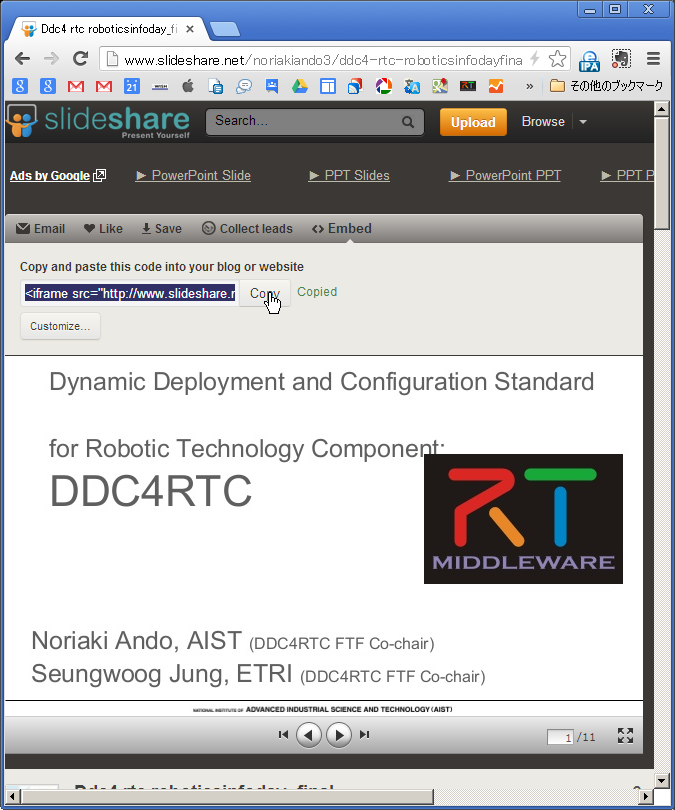
クリップボードには以下のようなiframeコードがコピーされているはずです。
<iframe src="http://www.slideshare.net/slideshow/embed_code/17413700" width="427" height="356" frameborder="0" marginwidth="0" marginheight="0" scrolling="no" style="border:1px solid #CCC;border-width:1px 1px 0;margin-bottom:5px" allowfullscreen webkitallowfullscreen mozallowfullscreen> </iframe> <div style="margin-bottom:5px"> <strong> <a href="http://www.slideshare.net/noriakiando3/ddc4-rtc-roboticsinfodayfinal" title="Ddc4 rtc roboticsinfoday_final" target="_blank">Ddc4 rtc roboticsinfoday_final</a> </strong> from <strong><a href="http://www.slideshare.net/noriakiando3" target="_blank">Noriaki Ando</a></strong> </div>
ここで、最初のほうにある、17413700 がスライドのIDです。このスライドを埋め込むには以下のようなコードを記述します。
 <nowiki>
 [ video:http://www.slideshare.net/17413700 ]
 </nowiki>
以下のように表示されます。
対応ビデオサイト
- archive
- bliptv
- capped
- collegehumor
- dailymotion
- flickr_slideshows
- flickr_video
- gametrailers
- gamevideos
- godtube
- metacafe
- myspace
- picasa_slideshows
- slideshare
- streamhoster
- teachertube
- vimeo
- wistia
- youtube
- youtube_playlist
